Walk-Through: How to Return Data from Custom Events

Learn how to send multiple types of data between workflows to build more modularly and efficiently.

Emmanuel Straschnov
January 31, 2024 • A quick read
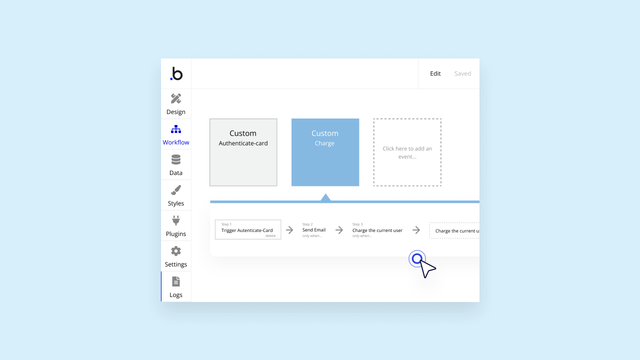
A screenshot of the workflows tab in the Bubble editor showing how to return data from custom events.

Bubble’s on a mission to be the only no-code app-building platform with the power and flexibility of custom code — without having to write any. This is why we're especially excited to release the ability to return data from custom events.

You are building amazing things on Bubble, and this feature makes it easier for you to not only build modularly, but to also scale more effectively — because your workflows can now send multiple types of data between one another.

For example, if you’re taking payments in your app, you can create a custom “authorization” event in your payment workflows that checks whether a user’s credit card can be charged. With this new feature, you can return a yes/no value for whether the user can be charged and an optional text value for an error message if they can’t. Then you can use these values in a new workflow that either:

  1. Charges the user’s credit card if they’re authorized or 
  2. Sends the user an “error” email if the authorization fails to remind them to resolve the issue 

Here’s how it works:

With return data from custom events, you can:

  • Reduce the number of custom events in your app: Use a single event to return different values, instead of multiple custom events with slight variations
  • Build more modularly and resourcefully: Edit ‌reusable custom events in one place, rather than multiple
  • Understand your app better: View one custom event, rather than multiple custom events with slight variations

This also means reusable elements can now hold global functions — so workflows will act even more like traditional programming functions.

Read more in our manual and give it a try today.

Start building for free

Build for as long as you want on the Free plan. Only upgrade when you're ready to launch.

Join Bubble

LATEST STORIES

October Demos and AMA: Agent 2, Building with Claude, and Importing Vibe-Coded Apps

October Demos and AMA: Agent 2, Building with Claude, and Importing Vibe-Coded Apps

At Bubble’s October AMA, Emmanuel Straschnov demoed Agent 2, the Bubble MCP (beta), and app import, then took questions and shared Launch Lab’s winners.

Emmanuel Straschnov
October 26, 2026 • 10 minute read
A check, lock, and warning logo in diamonds on a blue background

How We Responded to This Week’s Node.js and PHP Vulnerabilities

On October 21, Node.js and PHP disclosed security vulnerabilities. Here’s how the team responded to make sure your apps were safe and secure.

Bubble
October 23, 2026 • 2 minute read
Best App for Inventory Management: 7 Options by Business Type

Best App for Inventory Management: 7 Options by Business Type

Compare seven types of inventory apps matched to how your business runs. You'll also learn which features and free-plan limits matter, and when building your own inventory app makes more sense than buying one.

Bubble
October 22, 2026 • 10 minute read
Illustration of a website shown on desktop and mobile side by side, with matching layout and buttons on both.

How to Make a Mobile-Friendly Website: 6 Steps to Get it Right

Learn how to make a mobile-friendly website that’s easy to read and use on phones and tablets, and how to test it on the devices your visitors use.

Bubble
October 22, 2026 • 10 minute read

What Can You Build on Bubble? 25 Examples to Inspire You

September 08, 2026 • 14 minute read

The Easiest Way to Build a Custom CRM With AI

September 01, 2026 • 17 minute read

What Is Bubble AI and How Does It Build Apps?

August 19, 2026 • 12 minute read

See How We Redesigned the Property Editor for Better Building

December 11, 2025 • 4 minute read

The Future of Bubble’s Editor: Introducing the New Workflow Tab

October 11, 2024 • 3 minute read

Build the next big thing with Bubble

Start building for free