Greetings from Bubble! We hope 2017 has been treating everyone well so far. We recently passed the 50,000 developers on Bubble, thanks everyone for your trust!
While we’re currently working hard on performance and reliability, we just pushed a major update to our Plugin System. You can now start building elements and client-side actions in Javascript, and add that to your app or share it with other Bubblers! This pretty much lets you extend Bubble in any way you need!
Element Plugins
We’ve been saying since the beginning Bubble was for without code. Well, as of today, coders will be able to use their coding skills to expand what Bubble can do! The Elements and Actions sections of the Plugin Editor are now open to everyone. In other words, you can start building some elements and actions in Javascript, and use them in the app editor as any built-in element. To start building a plugin, go to your Plugins Page, and create a new plugin.
You can find a documentation for creating plugins here, and in the Plugin Editor itself. A contextual reference will show you how the API works and to which objects you have access when you’re coding an element. The general spirit is that you start by defining the different fields users will need to fill in the Property Editor in edit mode, the events and the actions that apply to your element, and then start implementing the code.
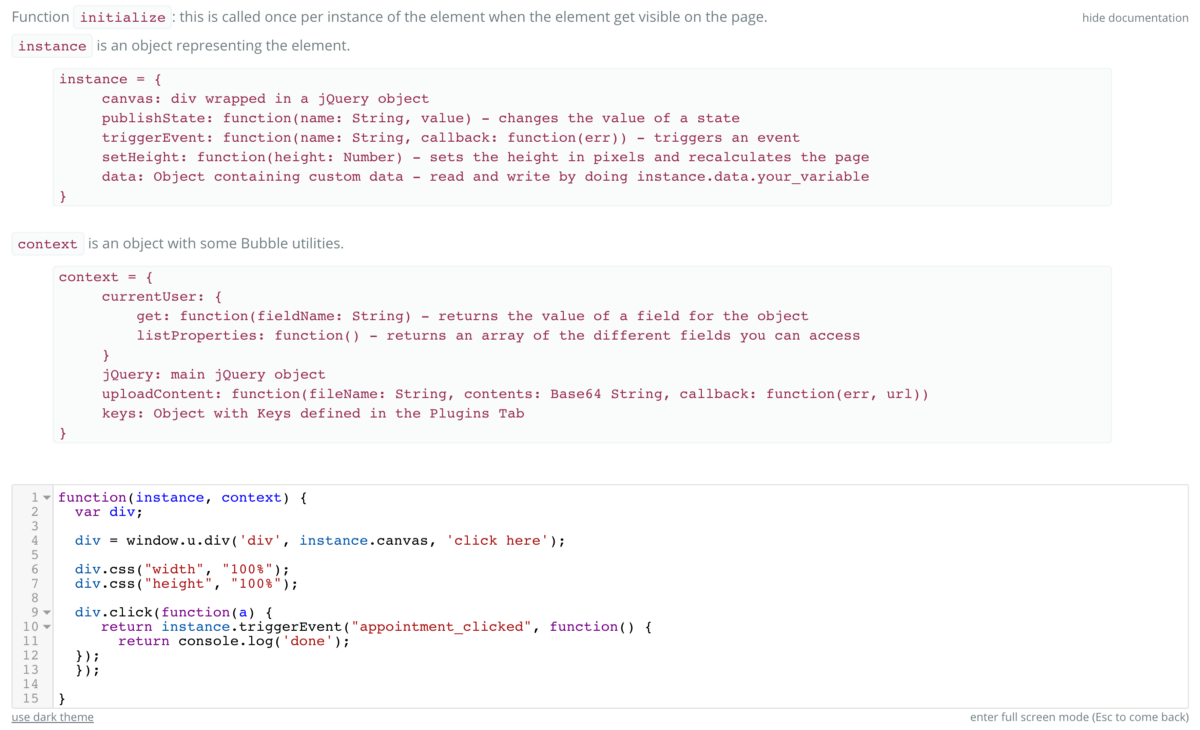
Elements can trigger workflows, have some actions modify their behavior, and expose some data to other elements. In other words, you can now build an entirely new UX element for your apps (or others’ apps).
Part of the release also lets you build client-side actions, for instance to send data to some analytics services, display something, etc.
What is next for the plugin system? Mostly two things:
1) Ability to write server-side actions, that can be used to save data, in emails, etc.
2) Ability for Plugin Builders to sell their plugins through a marketplace.
This will be our focus for the next few weeks.
Recurring Workflows
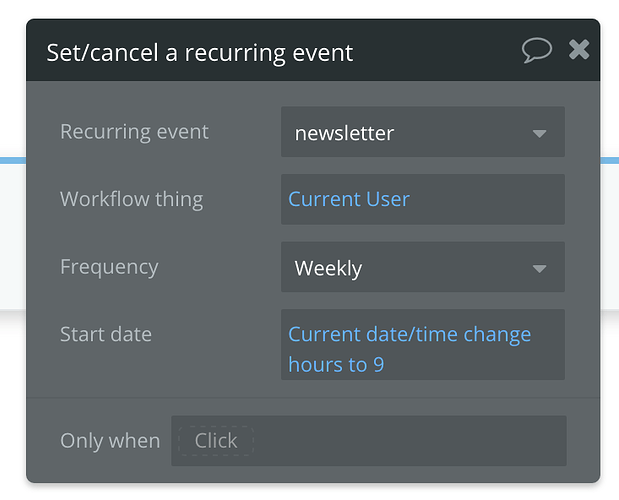
Users have asked for a while to be able to schedule monthly, weekly or daily operations. This is now possible if you’re on a paid plan. You can now create Recurring Events in the API section of your app (after you’ve activated the Workflow API). Unlike API Events, these workflows cannot be triggered through a POST request, but can be used in a “Set/cancel a recurring event”.
Once you’ve defined this event, you can use a “Set/cancel a recurring event” action in your workflow. This action takes an event, a thing, a frequency and a start date. Note that the same action is used to cancel a recurring workflow, just pick ‘none’ for the frequency.
Language support
As the community grows, we’ve been adding more and more languages for your apps. Thank to Community members, we recently added Hebrew, Arabic, Chinese and Estonian. As of today, beside English, Bubble apps can be used in Arabic, Catalan, Czech, Danish, Dutch, Estonian, Finnish, French, German, Greek, Hebrew, Italian, Norwegian, Portuguese, Romanian, Russian, Spanish, Swedish, Turkish, Simplified Chinese and Traditional Chinese.
Please reach out if you’re in a different location! Watching Bubble apps being used in all these countries is one of the most rewarding things we could hope for!
Other improvements
We’ve added a lot of other things over the last month. If you follow the forum you’ll see the whole list of announcements and our Release Notes, but here is in a nutshell:
- Ability to have a condition on an action. This lets you skip an action if a condition is not met, increasing the control on your workflows, while making their design simpler.
- Improvements to the Debugger so that you can inspect invisible elements (and understand why they’re not visible…)
- Improvements to the Server Logs; you can now search for specific actions, errors, zoom on a given workflow, etc.
- Improved database restore features: you can pick a particular type to copy from live to development or to restore.
Build for as long as you want on the Free plan. Only upgrade when you're ready to launch.
Join Bubble