TL;DR: No-code app builders range from simple spreadsheet tools like Glide and Softr to full-stack platforms like Bubble. Choosing the right one depends on output type, backend, AI control, learning curve, app store support, and pricing. AI coding tools like Lovable and Bolt generate code through chat; no-code platforms let you edit design, data, and logic directly.
Every no-code app builder can help you build fast, but they’re not all the same. Some are built to turn a spreadsheet into a simple internal tool.
Others are full-stack platforms that can help give you everything you need to launch, scale, and maintain a real app. Pick wrong, and you’ll either be overpaying for the job you need or starting over when you run into a wall.
In this guide, we walk through nine tools and what they do best, so you can figure out which one works for the app you want to build.
What to look for in a no-code app builder
Here are the six factors that actually matter. Get any one of them wrong, and you’ll be adding another tool or rebuilding later.
Output type: Figure out whether you need web, native mobile, or both. Native mobile apps get you into the App Store and Google Play Store, and they can reach further into the device itself — camera, push notifications, location, sometimes biometrics, depending on the builder.
But building for iOS and Android takes more setup than building a browser-based app. Some platforms (like Bubble) can handle both web and mobile from a single editor with a shared backend, which speeds up build and maintenance time; others are web-only or need a separate tool for mobile.
Built-in backend vs. bring-your-own: The backend is the part of your app that stores data, handles logins, and runs your business logic. Some platforms build it in, so you go from idea to live app without leaving the editor. Others leave that to you: You’ll set up an external service like Xano, Firebase, or Airtable yourself, which means more work and one more thing to maintain.
AI generation and what happens after: Most no-code platforms have AI to help you build a first draft fast, but the difference shows up in how much the AI can build.
Some tools generate a full working foundation of your app, including the backend and workflows. Others generate just basics, like the initial screens, and leave the backend and logic for you to build yourself. Or you might get stuck with a plan limit on how much AI generation you get.
Learning curve vs. customization ceiling: Easier platforms get you to a working demo faster, but you’ll run out of ways to customize it sooner. More capable platforms take longer to learn, in exchange for real control over complex logic, data relationships, and design. Which one is right depends on your technical comfort and how far you expect to take the product.
App store publishing: If you need a native app in the App Store or Google Play Store, budget time for a build pipeline, developer accounts, and store review. Some platforms handle much of this inside their editor. With others, you’re on your own or need developer help.
Pricing at scale: Many platforms start free, then charge based on some mix of plan tier, seats, users, records, workflow actions, updates, workload, or AI credits. The starting price rarely tells the full story. A platform at $29/month today could cost $500/month at 10,000 users if pricing scales unpredictably.
At a glance: the 9 best no-code app builders compared
Comparing platforms is easier when you can see the core differences side by side. Here is a quick breakdown of the top no-code app builders based on what they do best, their output types, and whether they include a built-in backend.
If you’re specifically looking to build native mobile apps, pay attention to the output type. Platforms like Bubble, Adalo, Thunkable, and Bravo Studio support native mobile development, while others are web-only or progressive web apps (PWAs).
| Best for | Output type | Built-in backend | AI generation | |
|---|---|---|---|---|
| Bubble | Real web and native mobile apps with AI speed and visual control | Web and native mobile | Yes | Yes (mobile in beta) |
| FlutterFlow | Developer-adjacent native apps | Native mobile, web, and desktop (with Flutter code export) | No | Yes |
| Adalo | Quick mobile MVPs | Native mobile and web | Yes | Yes |
| Glide | Internal tools and portals | PWA | Yes (Glide Tables plus external) | Yes |
| Softr | Client portals and dashboards | Web (PWA) | Yes (Softr Database plus external) | Yes |
| Thunkable | Device-feature-heavy apps | Native mobile and web | Limited (Cloud Database, Authentication) | Yes |
| Bravo Studio | Figma-to-native design teams | Native mobile | No (Bravo MCP beta adds a Convex-backed path) | Yes (beta) |
| Backendless | Standalone backend for any frontend | Backend-first | Yes | Limited |
| WeWeb and Xano | Modular frontend/backend teams | Web | Modular | Yes |
No-code vs. AI coding tools: What’s the difference in 2026?
AI coding tools like Lovable, Bolt, and Replit generate traditional code through chat. They can get you to a working prototype quickly, but precise control over logic, backend behavior, or data structure is harder to come by. You’re often stuck re-prompting and hoping it gets closer, or opening the code yourself to fix it directly.
Bubble takes a fundamentally different approach. Instead of leaving you with generated code to decipher, Bubble turns your app into visual workflows, data structures, privacy rules, and UI you can inspect and edit directly. You get AI speed to start and visual control to finish.
A note on how we selected these platforms
Different founders need different tools at different stages, so this list isn’t just nine ways to say “use Bubble.”
We evaluated each platform on what it’s actually built for, its limitations, how pricing scales, and how it stacks up against alternatives. A few made the cut for excelling at one specific job, like turning a spreadsheet into an app or building native mobile with blocks.
The 9 best no-code app builders for founders in 2026
Here’s how the nine platforms break down.
1. Bubble: Best to launch production web and mobile apps with visual control
Bubble is the only fully visual AI app builder. Every layer of your app, including the UI, database, privacy rules, and workflow logic, is editable, and none of it is generated as code you’d have to read or maintain.
Bubble AI helps you start from a prompt for both web and native mobile, and the Bubble AI Agent (beta) continues with you inside the editor so you can chat for speed or edit directly for control.
Bubble handles the infrastructure, including database management, hosting, deployment, and automatic scaling, plus security essentials like privacy rules and SOC 2 Type II compliance, across both web and native mobile. For native mobile, Bubble also supports app store publishing from the editor, along with native device access such as camera, location, and push notifications.
Over-the-air (OTA) updates let you push bug fixes, text changes, and light UI tweaks to a live app without resubmitting to the stores. Major changes still require a new build and store review.
Best for:
- Founders building products they plan to scale, not just prototypes. Bubble takes you from MVP to a production app you can launch to real users and keep scaling without rebuilding on another platform.
- Teams that want web and native mobile from one platform. A single project powers the web app and iOS/Android apps from the same backend, eliminating the need to maintain separate codebases.
- Builders who want to chat with AI when they want speed and edit directly when they want control. Generate a workflow with AI, then open it in the editor to adjust each step. You’re never locked into prompting when you’d rather build or tweak directly in the visual editor.
- Products that need security and compliance built in from day one. SOC 2 Type II compliance is included, and Bubble AI can generate privacy rules for new sensitive data types, though builders should still review and configure them for their app’s needs.
Limitations:
Usage-based pricing (Bubble calls these workload units) can increase costs if you don’t build workflows efficiently. The native mobile builder is in public beta, with native iOS/Android apps sharing the same backend as your web app.
You still need Apple or Google developer accounts and must complete each store’s review process.
Bubble gives you more control than simpler tools on this list, which means there’s more to learn — but that understanding pays off because you can see, maintain, and scale what you build instead of relying on code you can’t edit. The Bubble Academy has lessons for whatever you need next, and the Bubble Forum connects you with thousands of builders who have already solved the problems you’re about to run into.
Pricing:
You can build and test on the free plan, but you’ll need a paid plan to launch. Combined web and native mobile plans start at $59/month for Starter, $209/month for Growth, and $549/month for Team, with custom Enterprise pricing.
Web-only plans start at $29/month, and mobile-only plans start at $42/month, both billed annually. You can toggle workload overages on paid plans.
Compare to: FlutterFlow (for native-first teams using Flutter and Firebase), WeWeb and Xano (for teams who want separated frontend/backend), Adalo (for simpler mobile MVPs).
2. FlutterFlow: Best for developer-adjacent native apps with Flutter and Firebase
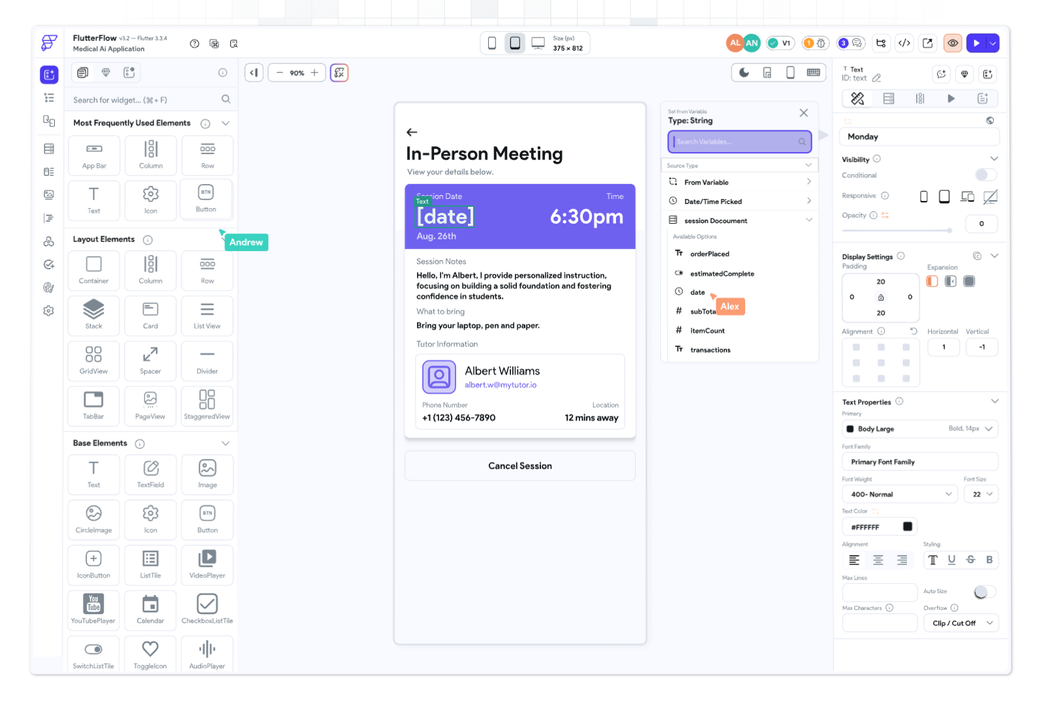
FlutterFlow builds Flutter-based apps for iOS, Android, web, and desktop using Google’s cross-platform framework, with native mobile as its core strength. Paid plans let you export the underlying code, and higher tiers add GitHub integration and a VS Code extension for working with it directly.
There’s no built-in backend, so you’ll connect to Firebase, Supabase, custom APIs, or Cloud Functions instead. Setting up and connecting that backend takes real technical comfort. State management (how your app tracks and updates data as users interact with it) can get complex in larger apps.
The learning curve is steeper than drag-and-drop builders like Adalo, though code export gives you the option to hand the project to a Flutter developer later. Per-seat pricing applies to team features.
Best for:
- Founders with a technical co-founder or part-time developer. Connecting to Firebase, Supabase, or Cloud Functions takes technical comfort with APIs, so this platform works best when someone on the team can handle backend configuration.
- Teams who want the option to extend or hand off a project later. Paid plans let you export the underlying Flutter code directly, so a Flutter developer can pick up where you left off.
- Teams that prefer working in Git. GitHub integration and a VS Code extension are included on higher tiers, which fits teams with existing developer workflows.
- Apps with complex state management. FlutterFlow assumes some familiarity with how mobile apps track and update data, which makes it better suited for teams comfortable with that complexity.
Limitations:
There’s no built-in full-stack backend, so apps require Firebase, Supabase, or another external service. Per-seat pricing can add up for small teams, and the learning curve is steeper for non-technical founders than Adalo or Glide.
Pricing:
You can build on the free plan, though it limits AI usage. Paid plans start around $39/month, with team features billed per seat and AI credits and Agent capabilities scaling with plan tier.
Compare to: Bubble (for full-stack without needing code export), Adalo (for simpler native mobile), Thunkable (for block-based native apps).
3. Adalo: Best for simple, fast mobile MVPs
Adalo is a drag-and-drop no-code app builder for native iOS, Android, and web apps. It comes with a built-in hosted database, plus support for external sources like Airtable, Google Sheets, and PostgreSQL through API integration.
It’s built for non-technical founders and has a low learning curve. The component-based editor doesn’t require any coding, and its AI tools, Magic Start and Magic Add, can generate a starting app or add features from a prompt. App store publishing, including compilation and submission, happens directly inside the platform, so there’s no backend to configure or workflow engine to learn before you get an app live.
The platform works well for apps with straightforward data models and standard interactions. As your logic gets more complex (deeply nested conditions, bigger databases, more integrations), some founders reach the limits of what Adalo can support and move to other platforms.
Best for:
- Solo founders who need to ship a mobile MVP fast. A built-in hosted database and app store publishing are ready out of the box, so you can go from idea to live app without configuring external services.
- Apps with simple, straightforward data models. Bookings, directories, or basic marketplaces fit Adalo’s component-based editor well, especially when the data relationships are flat rather than deeply nested.
- Founders who want native app store publishing without hiring a developer. Adalo handles compilation and submission directly inside the platform, removing the need for Xcode or Android Studio.
- Teams where getting to first users matters more than deep customization. Adalo’s lower learning curve compared to other platforms on this list means you can validate faster, even if you’ll eventually outgrow it.
Limitations:
Adalo starts to show its limits as your app gets more complex. Advanced integrations may need workarounds, and performance can dip with large datasets or deeply nested logic.
Pricing:
You can build and test on the free plan, and paid plans start around $36/month, with native app store publishing requiring a paid tier.
Compare to: Thunkable (for device-feature-heavy apps), Bubble (for more complex logic and full-stack needs), FlutterFlow (for developer-adjacent teams).
4. Glide: Best for turning spreadsheet data into internal tools and portals
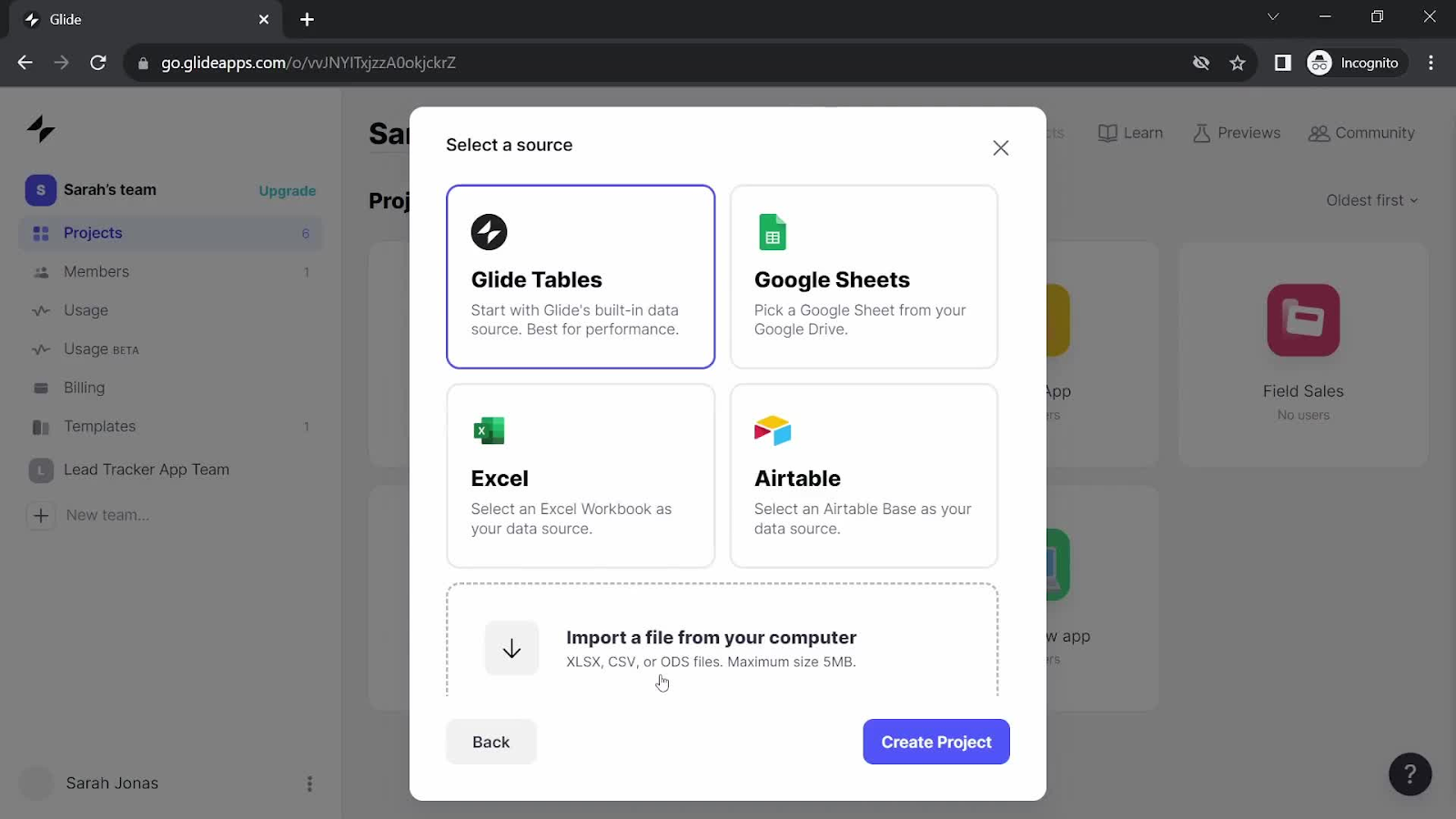
Glide turns structured data from Glide Tables, Google Sheets, Excel, CSV, or Airtable into mobile-friendly apps. Glide AI can also generate an app (including screens, tables, user roles, and sample data) directly from a written prompt.
The output is a progressive web app (PWA), not a native app. You can save it to a home screen, but it isn’t distributed through the App Store or Google Play Store, and it has limited access to device hardware. That matters if you need app store distribution.
Common use cases include internal tools, ops portals, directories, and lightweight CRMs. It includes a component library and role-based permissions. Glide Workflows can automate tasks like email notifications and scheduled record updates, though plan limits apply and some automations may still call for a third-party integration.
Best for:
- Founders building internal ops tools or dashboards for their own team. Data turns directly from Google Sheets or Airtable into a working app, so you can have something functional in an afternoon.
- Teams whose data already lives in a spreadsheet and want a frontend fast. You can also prompt Glide AI to generate screens, tables, and sample data in one pass if you’re starting from scratch.
- Customer-facing directories or portals that don’t need app store distribution. Glide’s output is a progressive web app you can save to a home screen, which works well for use cases where native distribution isn’t required.
- Products where showing data well matters more than custom logic. Glide’s component library and role-based permissions handle display-heavy use cases without requiring you to build complex workflows.
Limitations:
Glide’s output is PWA only, so there’s no App Store or Google Play Store distribution. Large datasets and complex logic can strain performance, and you’re subject to the record and row limits of whichever external data source you’re using.
Pricing:
You can build on the free plan, and Glide Business starts at $199/month billed yearly, with 30 users and 5,000 monthly updates included. Enterprise pricing is custom.
Compare to: Softr (for Airtable-based portals), Bubble (for web apps that also need native mobile), Adalo (for native mobile distribution).
5. Softr: Best for Airtable-powered client portals and dashboards
Softr is a no-code builder for portals, dashboards, and member sites. It connects to Airtable, Google Sheets, or Softr’s own database, and its AI Co-Builder can generate the database, app, and business logic from a prompt. Its UI is block-based: You assemble your app’s screens from pre-built functional sections (lists, charts, forms, calendars, maps) rather than designing from scratch.
The platform is web-first and doesn’t support native mobile distribution. When you use Airtable or Google Sheets as the backend, those tools’ record limits and pricing apply to your app too. Custom logic beyond the available blocks typically requires workarounds or external integrations.
Best for:
- Agencies and consultants that manage client data in spreadsheets and need a professional portal fast. Softr connects directly to Airtable or Google Sheets, so you can build on top of data you’re already maintaining.
- Teams that are building portals for external users, with or without existing data. If you’re starting from scratch, the AI Co-Builder can generate the database, app, and business logic in one pass.
- Fast-launch teams that need to launch a portal quickly without managing their own backend infrastructure. Softr handles hosting and database management, so you can focus on the user-facing experience.
Limitations:
Softr’s own database and workflow tiers also have plan-based record and action limits, and custom logic is more limited than on full-stack builders.
Pricing:
You can build on the free plan, and paid plans start around $49/month, with user and action limits varying by tier.
Compare to: Glide (for spreadsheet-powered mobile-friendly apps), Bubble (for more custom logic and full-stack control), WeWeb and Airtable (for more frontend flexibility).
6. Thunkable: Best for block-based native apps where device features are central
Thunkable is a block-based app builder for native iOS, Android, and web apps. You connect logic blocks instead of writing code, similar to Scratch.
It gives you access to native device capabilities like camera, GPS, sensors, and push notifications, and Thunkable has added Cloud Database and Authentication features for lightweight backend needs. AI-assisted app creation is included too, with token limits by plan. Biometric support appears to be available for AI-generated projects, so confirm current scope before relying on it.
Block-based logic can become harder to manage and debug as your app grows more complex.
Best for:
- Founders building apps that rely heavily on camera, GPS, or sensors. Native access to these capabilities suits hardware-dependent use cases; verify biometric support for your project type before committing.
- Education-focused products or apps where block-based logic itself supports the learning experience. The Scratch-like interface is familiar to anyone who’s used visual programming in educational contexts.
- Simple consumer apps that need native publishing without complex logic. Thunkable’s block-based editor keeps the build simple when your app’s core functionality is straightforward.
- Teams already familiar with block-based programming from tools like Scratch. That familiarity carries over directly to Thunkable’s logic blocks, reducing the learning curve.
Limitations:
Complex apps become harder to maintain as block logic grows, and UI design tools are less polished than some competitors. Built-in Cloud Database and Authentication help with lightweight needs, but heavier backend logic may still require external services. Built-in analytics are limited too.
Pricing:
You can build on the free plan, and paid plans start with Accelerator at $19/month, then Builder at $59/month for one live published app, and Advanced at $189/month for unlimited published apps. Enterprise and Education plans are custom.
Compare to: Adalo (for simpler native mobile without block logic), FlutterFlow (for developer-adjacent native apps), Bubble (for full-stack with mobile).
7. Bravo Studio: Best for Figma-to-native when design fidelity is the priority
Bravo Studio comes in two paths: Classic and Bravo MCP. Classic maps your existing Figma designs onto native iOS and Android app components, so if you’ve already got polished Figma files, you skip rebuilding the design from scratch in a separate editor. Bravo MCP, a newer beta path, lets you build via AI chat in Claude, ChatGPT, or Cursor with a React Native and Convex-based backend included.
Classic doesn’t include a built-in database or CMS. It typically connects to external services and APIs instead, including REST APIs, Firebase, Stripe, RevenueCat, and push notification services. Connecting data and logic requires familiarity with APIs.
Best for:
- Design-led founders or agencies with existing, polished Figma files. Bravo maps Figma layers directly onto native app components, so your design work translates without rebuilding.
- Products where pixel-perfect visual fidelity is a core requirement. Bravo Studio removes the need to rebuild a finished design in a separate editor, preserving the exact look you created in Figma.
- Teams with a backend already in place who just need a fast path to native mobile. You connect through external services and APIs like Firebase, Stripe, and RevenueCat rather than building backend logic from scratch.
- Apps where the design is finalized and the remaining challenge is making it functional. Bravo Studio wires up interactions and data directly onto the finished design, so the design-to-app gap is minimal.
Limitations:
Classic has no built-in backend or database, so you’ll need external services, and connecting logic and data can get complex for non-technical founders. App add-ons can also increase total cost significantly. Bravo MCP is still evolving, so check current documentation for its latest capabilities.
Pricing:
You can build on the free Starter plan. Bravo Studio lists the Solo plan at €19/month or €189/year, with approximate USD equivalents around $23/month or $240/year. (Bravo Studio prices in EUR; USD equivalents vary by exchange rate.) Check Bravo’s pricing page directly for team pricing.
Compare to: FlutterFlow (for more built-in logic and Firebase integration), Adalo (for a more self-contained native mobile builder), Bubble (for full-stack with mobile).
8. Backendless: Best for a standalone backend you can pair with any frontend
Backendless gives you a visual frontend editor plus a backend that handles the database, user authentication, server-side logic, API management, real-time connections, push notifications, and role-based security. You can build your frontend right in Backendless, or pair its backend with a separate frontend tool if you want deep control over the architecture on both ends.
Server-side logic just means rules that run on the server instead of the browser: sending emails, processing payments, running scheduled jobs, or handling calculations that shouldn’t be visible to users. AI can’t do as much of the building here as it can on other platforms in this list, so you’ll be doing more of it by hand in the visual tools.
It assumes familiarity with backend concepts like API design, database relationships, and business logic separation.
Best for:
- Founders building API-first products around a backend-first architecture. Backendless provides a dedicated backend you can pair with any frontend of your choice, giving you flexibility in how you build the user-facing layer.
- Teams where backend data integrity and security are the primary concern. Role-based security and real-time connections are included by default, so you can focus on data architecture rather than security implementation.
- Builders who already have a frontend, whether that’s WeWeb, FlutterFlow, or something custom. Backendless works as a backend you plug into an existing frontend rather than requiring you to use its own UI tools.
- Apps with complex server-side logic or high-volume data processing. Tasks like sending automated emails, processing payments, running scheduled jobs, and handling calculations that shouldn’t be visible to users are all managed through Backendless’s visual logic builder.
Limitations:
The learning curve is steep for non-technical founders, and metered features require careful planning to avoid unexpected costs.
Pricing:
You can build on Backendless’s free tier. Backendless also offers Cloud paid options with published plan details, while Pro, Managed, or custom deployments may require contacting sales. Check Backendless’s pricing page for current rates and limits.
Compare to: Xano (for a more modern visual backend), Bubble (for full-stack in one editor), WeWeb and Xano (for a modular frontend/backend stack).
9. WeWeb and Xano: Best for teams who want modular frontend and backend at scale
Some teams would rather pick the best tool for each layer than commit to one integrated platform, and WeWeb and Xano are a common pairing for that approach.
WeWeb is a visual frontend builder with granular control over design and UI components. Xano is a no-code backend platform with a visual database, API builder, and server-side logic. Together, they form a modular full-stack setup, with the frontend and backend as separate tools that communicate via API.
Launched in 2026, Xano’s AI agent can build and debug backend logic across your workspace, and WeWeb has its own AI for generating the frontend. WeWeb connects to Supabase and Airtable, and it can work with Google Sheets too (mostly for reading data rather than writing it, for now). Check WeWeb’s docs for the latest on other connectors.
Best for:
- Teams who want to split frontend and backend work by layer. WeWeb handles the frontend while Xano manages the database and API, so different team members can work on their respective areas independently.
- Founders who want to start no-code but keep the option to replace one layer later. The two tools communicate via API, so either side can be swapped independently without rebuilding the other.
- Products with highly custom frontend design and complex backend logic. WeWeb’s granular UI control pairs with Xano’s visual database and function stack to handle complex requirements on both ends.
- Teams that want AI generation on both the frontend and backend. Xano’s AI agent builds and debugs backend logic while WeWeb generates frontend UI from prompts, so you get AI assistance across the full stack.
Limitations:
Running two tools means two learning curves, two subscriptions, and more coordination than a single-platform approach. Connecting them requires setting up and troubleshooting the API integration yourself, which takes more technical comfort than solo non-technical founders typically have.
WeWeb produces web apps only, with no native mobile output, so this stack isn’t an option if you need iOS or Android apps. Xano offers a free plan with API rate limiting; check Xano’s current pricing page for the latest free-tier database and API limits.
Pricing:
Xano paid plans start at Essential at $85/month billed annually, Pro at $224/month billed annually, and Custom above that. A free tier is also available. Combined cost varies by tier and usage.
Compare to: Bubble (for a single-platform full-stack alternative), Backendless (for backend-focused builders), Softr or Glide (for simpler use cases that don’t need this level of modularity).
No-code app builder comparison
Here’s how the nine platforms compare across the dimensions that matter most for founders.
| Output type | Built-in backend | AI generation | Best for | |
|---|---|---|---|---|
| Bubble | Web and native mobile | Full backend | Yes (web and native mobile, mobile in beta) | Real web and native mobile apps with AI speed and visual control |
| FlutterFlow | Native mobile, web, and desktop (with code export) | Firebase, Supabase, or Cloud Functions | AI credits scale by plan | Developer-adjacent native apps |
| Adalo | Native mobile and web | Built-in hosted database | Limited | Quick mobile MVPs |
| Glide | PWA (mobile-friendly web) | Glide Tables plus external | Limited | Internal tools and portals |
| Softr | Web (PWA) | Softr Database plus external | Yes | Client portals and dashboards |
| Thunkable | Native mobile and web | Limited (Cloud Database, Authentication) | Yes (AI token-based) | Device-feature-heavy apps |
| Bravo Studio | Native mobile | External API only (Bravo MCP beta adds Convex backend) | Beta (Bravo MCP) | Figma-to-native design teams |
| Backendless | Backend-first; pairs with any frontend | Backend plus frontend editor | Limited | Standalone backend for any frontend |
| WeWeb and Xano | Web (with Xano backend) | Modular | Yes (Xano Agent, WeWeb AI) | Modular frontend/backend teams |
Pricing changes often, so treat these numbers as a starting point. Check each platform’s pricing page for the latest rates and tiers before you commit.
Which no-code app builder is right for you?
Here’s how that breaks down by platform.
- You’re building a full-stack web or native mobile app and want to understand how it all works: Bubble’s visual workflows and built-in database let you see and edit the logic directly, so you can use AI for speed and switch to visual control whenever you need precision.
- You need native iOS and Android and you’re comfortable with Firebase and Flutter’s ecosystem: FlutterFlow is built on Flutter and connects natively to Firebase. It supports code export, which gives teams the option to extend or hand off the project to a Flutter developer later.
- You want to ship a simple mobile MVP to the app stores without configuring a backend: Adalo’s drag-and-drop builder and built-in publishing pipeline handle compilation and submission. It works well for apps with straightforward data models and standard interactions.
- Your data already lives in Google Sheets or Airtable and you need a frontend quickly: Glide and Softr both connect directly to existing data sources. Glide outputs a PWA; Softr is suited to portals and dashboards with role-based access.
- Device hardware like camera, GPS, or sensors is central to your app: Thunkable uses block-based logic and includes access to native device capabilities including camera, GPS, sensors, and push notifications, with lightweight Cloud Database and Authentication support built in.
- Your design work is done in Figma and you need a fast path to native mobile: Bravo Studio maps your Figma design layers to native iOS and Android app components.
- Backend control and data architecture are your primary concern: Backendless offers a visual backend with an optional visual frontend editor. WeWeb and Xano pair a visual frontend with a no-code backend that communicates via API, suited to teams with distinct frontend and backend responsibilities.
Most platforms have free tiers, so building the same core user flow in two or three candidates is a practical way to evaluate fit before committing. Pick your top options this week and see how each one actually feels to build in.
Start building your no-code app
Of the nine platforms here, Bubble is the only one that takes you from an AI-generated first draft all the way to a production app for both web and native mobile, in the same editor, sharing one backend. You get AI speed to start, and enough visual control to keep building without outgrowing the platform. Chat with the AI Agent when you want speed, or open the visual editor when you want precision — you’re in control either way.
The Free plan has no time limit, so you can build and test for as long as you need. Create a free Bubble account and start building today.
Frequently asked questions about no-code app builders
What is a no-code app builder and how does it work?
A no-code app builder is a platform that lets you create web or mobile applications through visual interfaces (drag-and-drop editors, workflow builders, and database designers) without writing code. The category covers a wide range of tools: from simple block-based portal builders to full-stack visual development platforms with AI generation and native mobile publishing.
Which no-code app builder is best if I have no coding experience?
The best platform depends on what you want to build. Glide and Softr are the most accessible for simple internal tools and portals, while Bubble is the strongest choice for fully functional web or native mobile apps that need to scale.
How do I build an app without knowing how to code?
You choose a visual development platform, then use a drag-and-drop interface to design screens, set up a database, and build logic through plain-language workflows — no programming required. Most platforms also include AI that generates your app’s initial structure from a prompt, so you can start with something functional and refine from there.
How is no-code different from AI coding tools like Lovable or Bolt?
AI coding tools like Lovable and Bolt generate traditional code through chat, and while some currently offer visual UI editing, deeper logic and backend changes often still depend on prompting or code-level understanding. Bubble generates visual apps instead of code, so you can inspect and edit design, database, privacy rules, and workflows directly.
Can no-code app builders produce production-ready apps?
Yes, though production readiness depends on the platform’s infrastructure, backend, security, deployment, and maintainability. Bubble supports that full journey with visual editing, hosting, database, security, and scaling built into one platform.
Does Microsoft have a no-code app builder?
Yes — Microsoft Power Apps is a low-code and no-code platform in the Microsoft Power Platform ecosystem, built primarily for enterprise internal tools with deep integration into SharePoint, Microsoft 365, and Azure. Founders building consumer-facing SaaS or native mobile products may prefer a dedicated app-builder platform instead.
What’s the fastest path to validate an idea this week?
Pick a platform with a free tier and AI generation, describe your core user flow in a prompt, and test what it produces with real people. Most platforms on this list — including Bubble, Adalo, Glide, and Softr — have free plans that let you build and test before committing to a paid tier.
Build for as long as you want on the Free plan. Only upgrade when you're ready to launch.
Join Bubble