
Hacking Bubble: The Download Hack

Learn how to let users download files from your Bubble app.

Ryan Roberts
October 24, 2016 • 2 minute read
Hacking Bubble: The Download Hack

Let’s say, you are making a cloud and/or sharing service. It would be disappointing to find out after putting in all of that work to make the app, you can’t have your users download an image from your website. At least it was for me, so if this very specific problem has occurred for you too, this article will explain how to make images download onto the user’s computer instead of doing this.

But can’t I just send the user to the file URL, wouldn't that download it for them, you ask?

Nope, probably. If this was any other kind of file, then most likely. We are talking about browsers here, so I can’t talk in absolutes. It’s difficult to assume a general behavior between all browsers as they can behave different from each other.

Okay, then what is probably the solution to this, you add?

This:
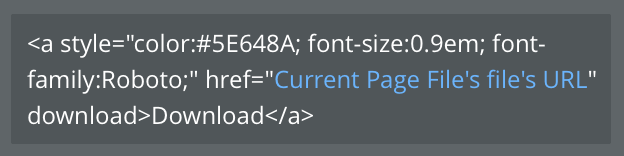
Let’s break this down. The <a> tag is for creating a link so we will need that to direct the page to the source image (or any file). The style=”” is a CSS element that you would use to style the button. href=”” is where you would enter the source file URL that the <a> tag will use. You can either copy and paste the static URL between the quotations if the file will not change, or add a dynamic element like I have. Finally, just type download after the href=”<link>”.

The addition of ‘download’ to the end of the href tag makes all of the difference, but then again, browsers, so I don’t know.

Just make an HTML element in Bubble and type this code in. You can change up the color hex, font-size, font-family, etc. Make it entirely how you want it to look. You can learn more about how to CSS in this Introduction to CSS.


Hacking Bubble is a series on how to make Bubble do things it probably wasn’t meant to do.

Don’t miss out on the latest Bubble content by signing up here.

Was this article useful? Do you have a better or different approach? Let me know!

Start building for free

Build for as long as you want on the Free plan. Only upgrade when you're ready to launch.

Join Bubble


LATEST STORIES

blog-thumbnail

Episode 10: Eric Ries on Why Good Companies Lose What Made Them Great

Eric Ries wrote The Lean Startup. His new book, Incorruptible, asks a harder question: Why do good companies stop being good?

Bubble
May 26, 2026 • 5 minute read
blog-thumbnail

AI Tools For App Development: A Complete 2026 Guide

Learn which AI tools fit your use case, how to choose between them, and how to go from idea to a launched web or mobile app — no coding background required.

Bubble
May 22, 2026 • 15 minute read
blog-thumbnail

May AMA Recap: Faster Shipping, Mobile Plugin Editor Rollout, and What's Next for Bubble

Emmanuel's May AMA covered Bubble's push to ship faster using AI internally, the mobile plugin editor landing next month, the AI Agent's rollout to existing apps, and a product launch livestream on June 3.

Emmanuel Straschnov
May 22, 2026 • 6 minute read
blog-thumbnail

The Best Way to Create a Mobile App for iOS and Android: 8 Steps

New to mobile app development? Our step-by-step guide will take you from idea to published app — and beyond — in eight steps, no coding required.

Bubble
May 22, 2026 • 17 minute read

What Can You Build on Bubble? 25 Examples to Inspire You

February 27, 2026 • 18 minute read

See How We Redesigned the Property Editor for Better Building

December 11, 2025 • 4 minute read

The Easiest Way to Build a Custom CRM (With AI, Updated for 2025)

October 10, 2025 • 17 minute read

The Future of Bubble’s Editor: Introducing the New Workflow Tab

October 11, 2024 • 3 minute read

Efficient App Building 101: Improving Your Workload Usage

July 01, 2024 • 3 minute read

Build the next big thing with Bubble

Start building for free