Walk-Through: Use the App Search Tool to Quickly Find Element Styles

Learn how to use the app search tool to more quickly find elements styles in use in your app.

Abhinav Narain
February 13, 2024 • A quick read
Walk-Through: Use the App Search Tool to Quickly Find Element Styles

Do you want to change the way a button looks in your Bubble app but you’re not sure where else you’re using that same element style? Enter: the app search tool. This is a quick and easy way to find all the elements using a particular style, no matter if your app is one page or 20. The app search tool isn’t new, but thanks to some big UX improvements in the styles tab, it’s now easier to use existing, helpful features like this one. 


To find all elements using the same style in your Bubble app:

  1. Select the element to open the property editor and click Edit style under the Style Attribute dropdown or open the styles tab
  2. Click Find elements in use on the rightmost side of your screen.
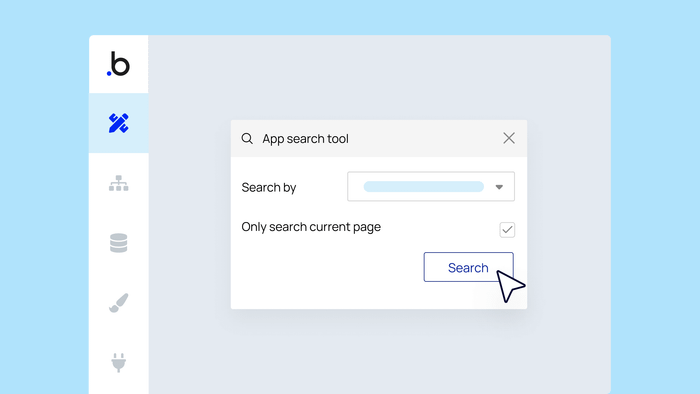
  3. This will launch the app search tool. You can see how many elements use this style, what pages they’re on, and see what they look like. Clicking on an element will take you to that page in your app. 

Bonus: You can use the app search tool to find more than just element styles. It works to help you quickly find almost anything in your app. Access it at any time by clicking the magnifying glass in the toolbar.

Start building for free

Build for as long as you want on the Free plan. Only upgrade when you're ready to launch.

Join Bubble


LATEST STORIES

blog-thumbnail

Bubble vs. Replit Comparison: Which AI App Builder Is Right for You?

Bubble provides all-in-one AI app generation alongside a visual editor that gives anyone full control and customizability of their app. Replit provides an IDE alongside AI support for code generation, iteration, and debugging. Which is right for you? We analyzed 11 key factors to help you decide.

Bubble
July 02, 2026 • 28 minute read
blog-thumbnail

The 7 Best AI Platforms for Subscription Products in 2026

Find the right AI platform for your subscription product, from AI SaaS to course memberships.

Bubble
July 02, 2026 • 16 minute read
blog-thumbnail

How to Launch a Subscription Product: 2026 Step-by-Step Guide

A practical plan to pick your model, validate pricing, build your billing, and go live with the right metrics.

Bubble
July 02, 2026 • 14 minute read
blog-thumbnail

How to Build an Android App in 2026: A Complete Guide

Learn to plan, build, test, and publish your first Android app using Bubble's fully visual AI app builder — or traditional Kotlin if you want to learn programming. No coding experience required for Bubble.

Bubble
July 02, 2026 • 18 minute read

What Can You Build on Bubble? 25 Examples to Inspire You

May 27, 2026 • 18 minute read

See How We Redesigned the Property Editor for Better Building

December 11, 2025 • 4 minute read

The Easiest Way to Build a Custom CRM (With AI, Updated for 2025)

October 10, 2025 • 17 minute read

The Future of Bubble’s Editor: Introducing the New Workflow Tab

October 11, 2024 • 3 minute read

Build the next big thing with Bubble

Start building for free