
TL;DR: Dogfooding is the practice of companies using their own products internally to catch bugs early, build genuine product empathy, and validate real-world usability before issues reach customers. While it’s a powerful quality control method, it works best when paired with external user testing, since employees are inherently power users who may unconsciously overlook poor UX that would frustrate new customers.
Think of some of your favorite software products that you use regularly.
Maybe it’s Figma for design, Notion for docs, Airtable for workflows — or Bubble, the fully visual AI app builder you use to launch real apps without code.
Your opinion of those products would probably change if you found out the company’s own teams didn’t use them.
If Notion used Google Docs for their company wiki instead of Notion, that would be a bit suspicious. If Figma employees didn’t use Figma for their own design needs, their marketing would feel unconvincing.
Enter: dogfooding.
What is dogfooding?
“Dogfooding” refers to the practice of using your own company’s product internally. Companies dogfood to catch bugs before customers do, build genuine product empathy across teams, and test whether the product holds up under real daily use. The term is common in the software and technology industries, though the concept applies anywhere a company can use what it sells.
The term is commonly traced back to dog-food advertising. It’s often associated with Alpo commercials featuring spokesperson Lorne Greene, who reportedly told viewers he fed Alpo to his own dogs. The phrase later became a metaphor in business and technology for using the products you promote or build. You might also hear this called “drinking your own champagne” if you prefer a glass-half-full approach.
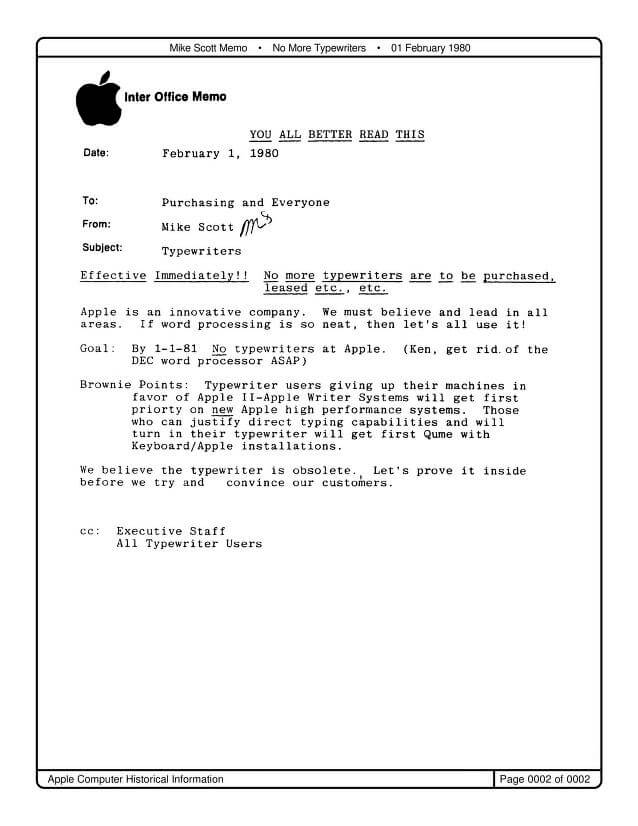
The jump to the technology world came soon after, when Apple CEO Michael Scott circulated a 1980 memo setting a goal of eliminating typewriters at Apple by January 1, 1981 in favor of Apple II and Apple Writer systems.
Microsoft has documented internal dogfooding programs for products such as Outlook and Exchange, and since then, the idea of dogfooding has become associated with technology development.
Why companies dogfood their own products
Starting a dogfooding program with your own products offers several distinct advantages for your development cycle and team culture.
- Identify and remove dependency issues early. When your internal team relies on the product daily, they encounter the same friction points and bugs that users do, allowing you to fix them before they reach the public. For example, if your app crashes when handling large file uploads, your team will discover that during their own work rather than waiting for a customer complaint.
- Create a more stable version of your product for customers. Consistent internal quality assurance means you are actively testing the product day-in and day-out, rather than waiting on bug reports from users. This ongoing usage surfaces edge cases that formal QA testing often misses.
- Gain clarity on the needs and goals of your target audience. Using the product for real tasks forces your team to experience the user journey firsthand, which builds empathy and highlights missing features. When your sales team uses your CRM to manage actual deals, they quickly learn which workflows feel clunky and which features are genuinely useful.
- Build stronger support for your product among internal teams. When employees use the tool they are building or marketing, they develop a deeper understanding of its value, which translates to more authentic marketing and better customer support. A support rep who uses the product daily can troubleshoot issues faster than one who only reads documentation.
Real-world examples of dogfooding
Dogfooding is a standard practice across the technology industry, from early-stage startups to the largest enterprise organizations.
Microsoft is often credited with popularizing the term and practice in the technology industry. The company has long used internal dogfooding programs; Microsoft documents employee-only Outlook dogfood builds and internal Exchange dogfooding before broader rollout. These programs are intended to test new versions internally and improve the customer experience before broader release.
Slack is commonly cited as another example, with its platform designed for internal communications. Slack’s core product includes collaboration features such as channels, threads, and integrations that became core to the product’s success.
How to dogfood your own product
Creating strong marketing is just one benefit of dogfooding. Done well, dogfooding as a practice can help a company significantly improve its product — if it’s not done superficially. This is not the same as Coca-Cola banning Pepsi products in the office, or a clothing store requiring its employees to only wear its brand.
Instead, teams who dogfood effectively increase internal usage of their product to speed up beta testing and generate significant internal feedback. This allows you to iterate faster and more effectively, and quickly make your product better.
Dogfooding isn’t always practical across an entire product, but most companies can find meaningful ways to use what they’re building. Here are two real approaches worth considering.
Dogfooding your own website
For many tech companies, dogfooding your own website is a great place to start. We do this here at Bubble: We dogfood Bubble across our own web properties and internal tools, using the same visual editor, database, workflows, hosting, and deployment capabilities our builders use to launch real apps. That gives our internal builders a daily feedback loop — they can test the same visual workflows, database logic, deployment paths, and AI-assisted iteration our community uses to build production apps.
Early in Bubble’s development, we knew that we wanted to give people the freedom and ability to build multi-page web apps that deliver polished, responsive design while also supporting the deeper logic, database, workflows, integrations, and scalability required for real web apps — capabilities that go well beyond what tools like Wix or Squarespace are built for. Building our own web app on Bubble acted as a forcing function to improve the full-stack capabilities builders rely on: responsive design, workflows, database logic, integrations, hosting, and fast iteration.
Bubble’s website is a complex app built on our own platform. By building it on Bubble, we can iterate quickly on new features and pages and enable our own builders to move quickly with AI-assisted workflows and direct visual editing — without getting stuck in code.
A great example is the Ideaboard, a page on Bubble’s main website where users can contribute and engage with ideas for product improvements. The concept isn’t unique to Bubble, but the team built it themselves because it’s a strong example of what Bubble is built for: user-generated content, database logic, moderation workflows, and fast iteration in a fully visual app. The first version came together quickly, which co-founder Josh Haas says shows “how Bubble helps you develop ideas fast.” The initial Ideaboard focused on collecting and prioritizing user ideas, with basic moderation for Bubble team members.
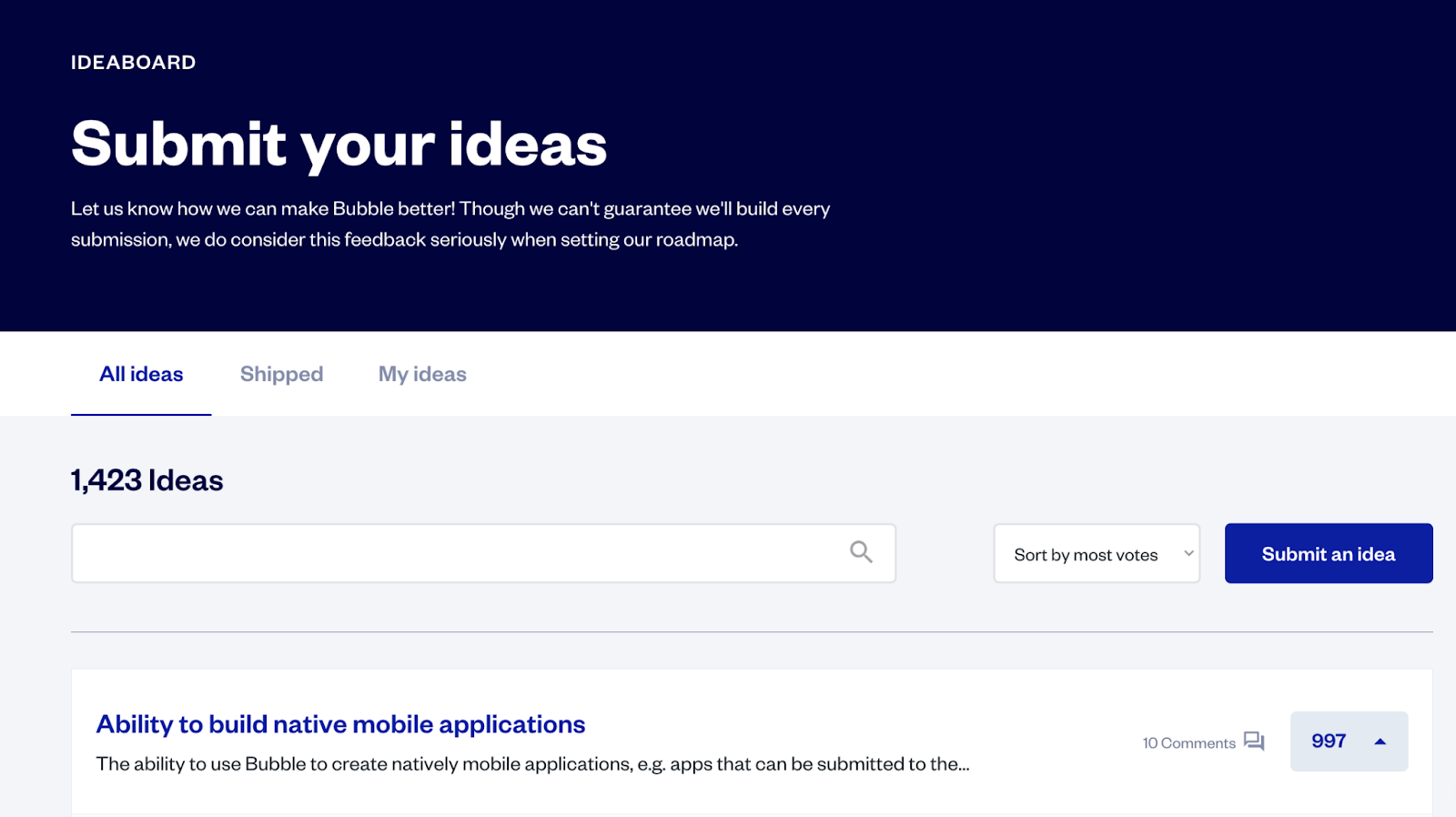
Today, the Ideaboard is a great source of feedback and ideas for the Product team as they work through what to prioritize on the roadmap. And the fact that it’s built on Bubble gives the team flexibility they might not have if they’d used a different service to build it.
“[We] set up our own moderation system tailored to the content and to the needs of our community,” Josh explains. “It can evolve as needs change ... You can imagine different new ways we could integrate the Ideaboard more deeply into other parts of the product experience to make it even smoother for our users.”
Want to learn more about how we do it? Check out our internal builders’ masterclass on How Bubble Builds Bubble for Scale.
Dogfooding products as custom internal tools
For many tech companies, using your own product as part of your internal tech stack is the easiest and most effective way to dogfood. For example:
- ClickUp should use ClickUp for their internal project management. If the tool creates friction for their own team — slow load times, confusing task views, clunky workflows — they’ll feel that friction before customers report it.
- Uber employees should regularly use Uber to get to and from the office. Experiencing the rider and driver side of the product firsthand surfaces usability issues that ride-along sessions and user interviews rarely catch.
- Slack should use Slack for their internal messaging system. Relying on it to build it means notification fatigue, search limitations, and threading issues become the team’s daily reality — not just a support ticket.
...and so on, all the way back to Apple using their own word-processing system instead of typewriters.
At Bubble, we use several internal tools built on our own platform. Because Bubble can power full-stack internal apps, our teams can build admin workflows that combine visual interfaces, database actions, permissions, and custom logic in one place. Our internal Content Admin tool is one example.
Building the tool on Bubble was a “no-brainer,” according to Bubble Developer Maria Posa. The Content Admin lets Bubble employees safely manipulate data in our app through a simpler interface with safety guardrails. Because it’s built on Bubble, the tool can go beyond CRUD (Create, Read, Update, and Delete) with visual workflows, database logic, privacy rules, and conditional behavior that teams can understand and update without code.
The Content Admin covers a wide range of content. On the simpler side, the People team has a page that allows them to add, edit, and delete employee records as part of the onboarding process.
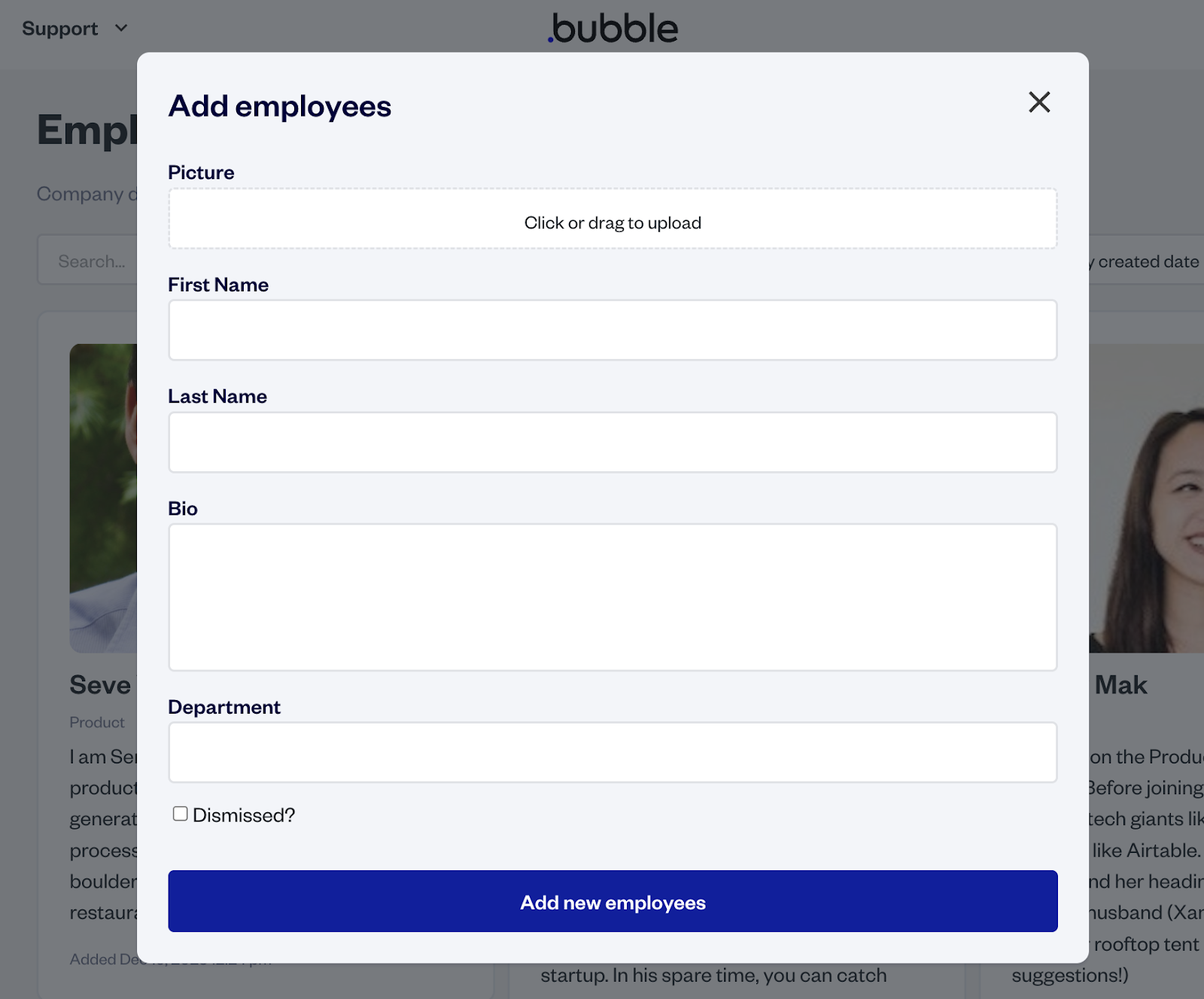
On the more complex side, the Marketing team can edit announcement banners to display important info about upcoming events and feature releases. “But it also automates logic like publishing in the future, showing the banner on specific pages, and allowing users to dismiss it a certain number of times,” Maria adds.
Your entire product may not make sense to use internally — but it’s likely that there are features your team could be using regularly for testing and feedback.
For example, a company like Loom may not want to replace all of their meetings with Loom videos. But they could use Loom features in interesting ways throughout their workflows, such as recording explainers for their blog or managing sales outreach with custom Loom messages. Implementing a variety of use cases for your product internally first gives you a stronger understanding of your product’s functionality and a clear way to test for potential inconsistencies.
When dogfooding has limits
While dogfooding provides invaluable feedback, it is not a complete replacement for external user testing. Your internal team members are inherently power users who understand the product’s architecture and intended workflows better than a new customer ever will.
Because employees already know how the software is supposed to work, they often unconsciously navigate around poor UX design or confusing interfaces. They also have a higher tolerance for bugs in early builds. To build a truly user-centric product, dogfooding works best when paired with objective external user research and usability testing.
Build the product worth dogfooding
Dogfooding isn’t the answer to every product challenge, but for Bubble it reinforces the same promise we make to builders: move quickly with AI, stay in control with visual editing, and launch real apps you can understand and maintain. It’s why we use Bubble to build and iterate on our own web apps, internal tools, and product workflows — the same full-stack visual platform, AI assistance, and deployment infrastructure our builders use.
Bubble combines Bubble AI with a fully visual editor, built-in database, workflows, hosting, security, and deployment so builders can launch real, customizable apps without writing code. Bubble lets you vibe code without the code, then use a fully visual editor to understand, customize, and scale what you build. That belief shapes everything we build: a fully visual AI app builder where builders of all backgrounds can create, launch, and grow real web and native mobile apps without getting stuck in code.
Building on your own platform is the most honest form of quality control there is. Get started for free and build a real app you’d actually want to use.
Frequently asked questions about dogfooding
Why is it called dogfooding?
The term is commonly traced to late 1970s television commercials for Alpo dog food, where spokesperson Lorne Greene reportedly said he fed Alpo to his own dogs — making “eating your own dogfood” a metaphor for using the products you promote.
What is an example of dogfooding in tech?
A classic example is Microsoft dogfooding early versions of its products internally, including Outlook and Exchange. At Bubble, we also use Bubble to build internal tools and product workflows, giving our teams direct experience with the platform.
What does “drink your own champagne” mean?
“Drinking your own champagne” is a glass-half-full version of dogfooding. Both phrases mean the same thing: a company using its own product internally to test it and prove its value.
Is dogfooding the same as beta testing?
No — dogfooding means a company’s own employees use the product in their daily work, while beta testing means releasing a pre-launch version to a select group of external users. Both gather feedback, but from very different vantage points.
Build for as long as you want on the Free plan. Only upgrade when you're ready to launch.
Join Bubble